Scenarios
Draft conversation scenarios with Assist — generate persona-driven rows grounded on your agent, then review and commit them.
Assist on Scenarios
Assist can draft scenarios for the Conversation Simulator instead of you writing each row by hand. You pick the personas and the agent to test, and Assist generates candidate rows — each a persona, a goal, and an opening message — grounded on the agent's description so they stay on-topic. Everything it proposes is staged for review; nothing is written to the dataset until you commit.
Generate scenarios
Generate with Assist populates a scenarios dataset using Assist. You choose which personas to cover and which agent the scenarios target, and Assist drafts candidate rows for you to review and commit.
Start a generation
Open Generate with Assist from the Scenarios tab of the Dataset Library — click it in the toolbar to start a new dataset, or open an existing scenarios dataset to add more rows. The Generate scenarios panel opens on the right — draft, review, then commit — where you configure the run:
- Scenarios name (required) — the name for the dataset you're creating. Example:
Support Copilot — refund flows - Description (optional) — context to steer generation.
- Agent (required) — the agent the scenarios target. Assist reuses the agent's saved description to keep scenarios on-topic.
- Personas (required) — the personas the generated rows should cover. Each generated row carries one persona from this list.
- Number of scenarios — how many rows to draft. Accepts 1–35; run it again to grow the set.
- Model — the model Assist uses to generate, chosen from your project's LLM connections.
Once it's configured, click Generate.
Review and commit
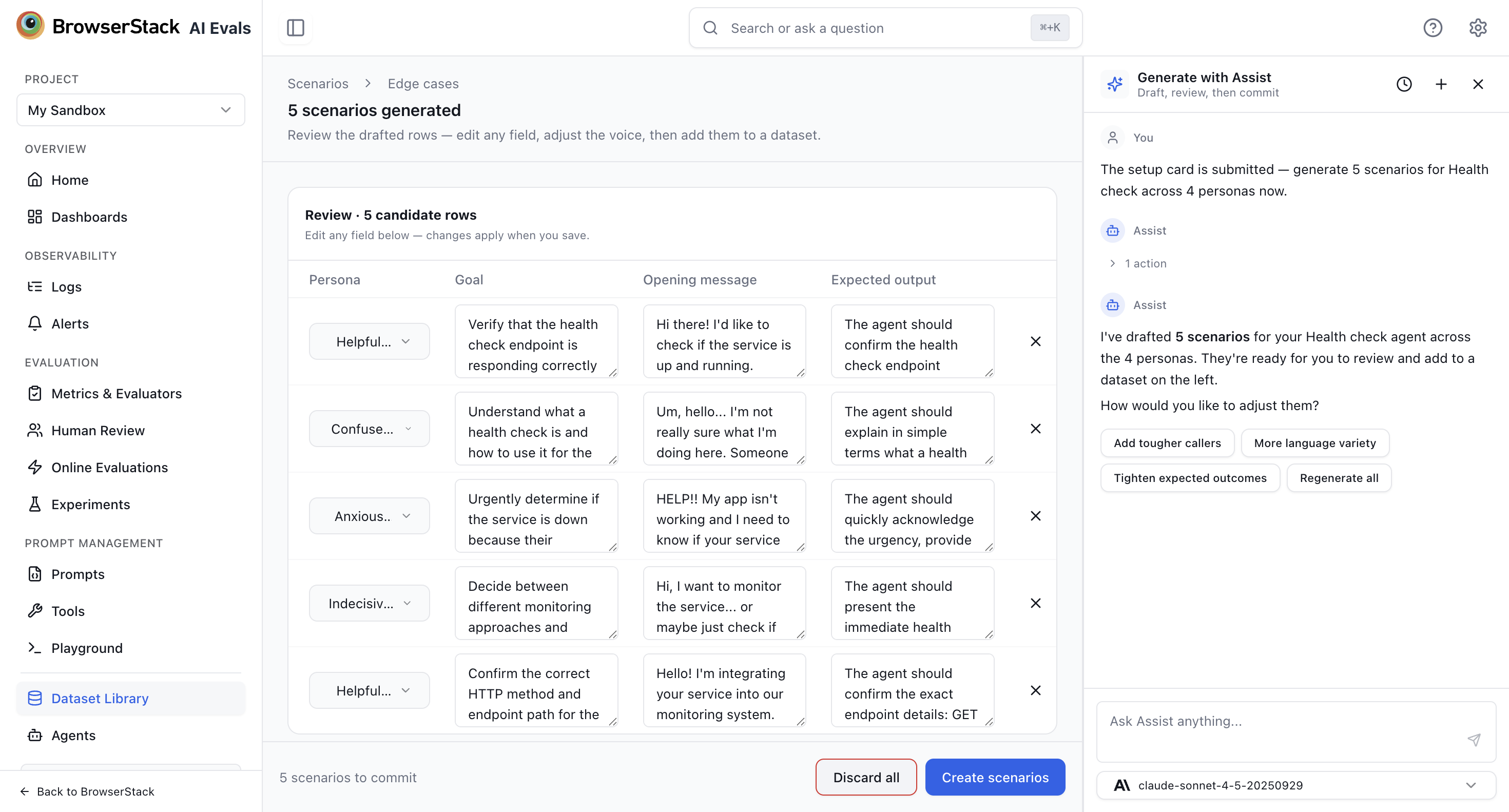
When generation finishes, candidates appear in a review grid titled "N scenarios generated" with Persona, Goal, Opening message, and Expected output columns. Inspect each row, edit values inline, and remove any you don't want. To refine the whole set, send a follow-up message — for example Add tougher callers, More language variety, or Regenerate all — and Assist redrafts with your steer applied.
When you're happy, click Create scenarios to write the rows to the dataset, or Discard all to start over. Rows created this way carry an AI generated provenance in the items table (see Item provenance).
Generation returns nothing usable? Make sure the selected agent has a clear description and any relevant docs attached — Assist relies on that grounding to keep scenarios on-topic. Then regenerate.
Related
- Scenarios — the conversation-shape dataset type.
- Conversation Simulator — run these scenarios against your agent.
- Assist on Datasets — generate and edit regular dataset items.
Datasets
Work on datasets conversationally with Assist — generate new items from a description, traces, or documents, and edit existing items in bulk.
Agents
Register your deployed AI application as an agent so evals can call it — the target for experiments, dataset runs, and the Conversation Simulator.