On-Prem Setup
Deploy the AI Evals platform on your own Kubernetes cluster for full control over data residency, compliance, and network isolation.
On-Prem Setup
Deploy the AI Evals platform on your own Kubernetes cluster for full control over data residency, compliance, and network isolation.
Architecture
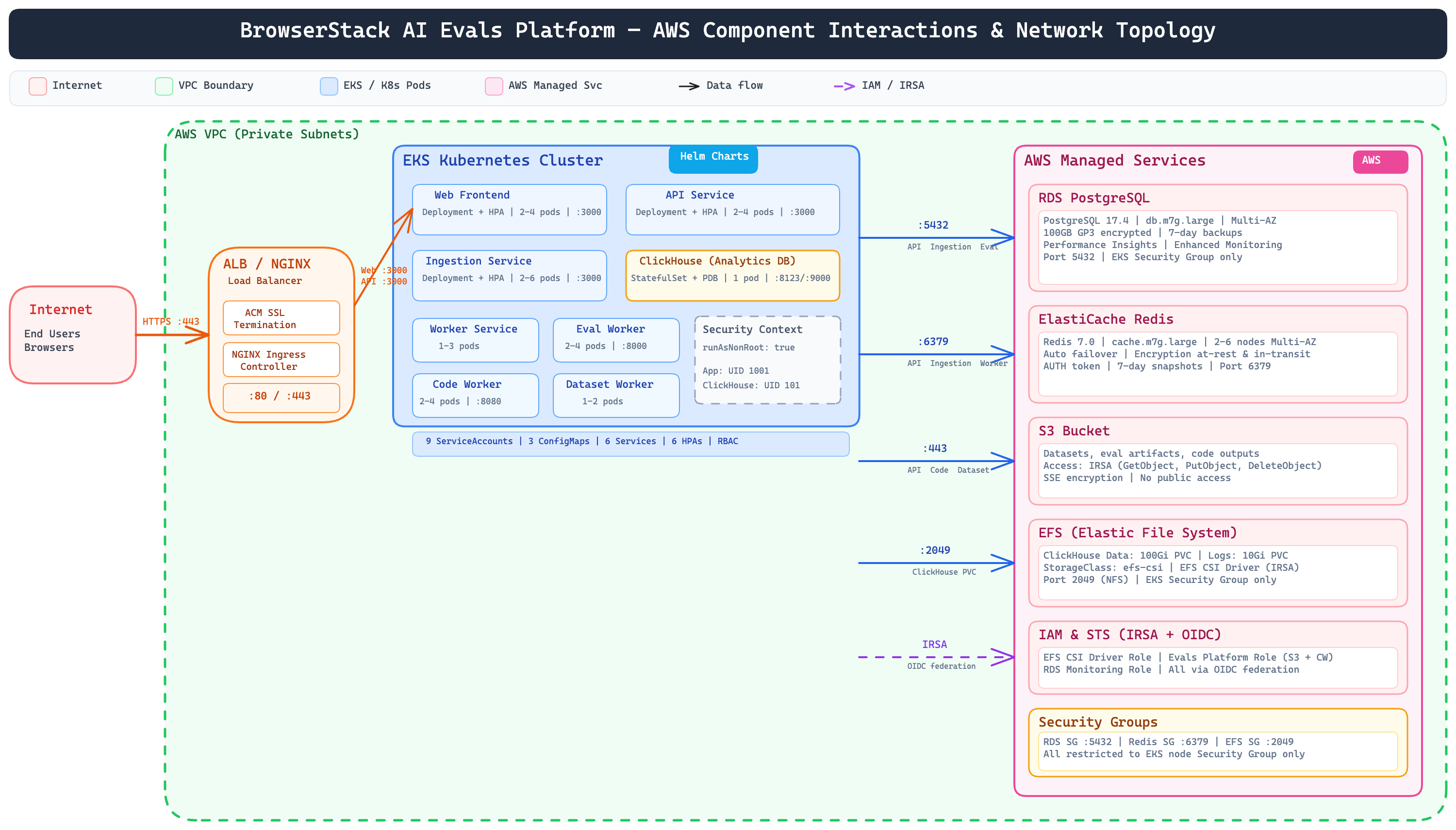
The AI Evals platform runs entirely within your AWS account inside a private VPC. There are no external dependencies or callbacks to BrowserStack infrastructure — all data stays within your network boundary.
How Traffic Flows
End users access the platform over HTTPS through an ALB (Application Load Balancer) with SSL termination via AWS ACM. An NGINX Ingress Controller routes requests to the appropriate service inside the EKS cluster.
Your application SDKs send traces to the Ingestion Service, which writes observability data to ClickHouse (analytics) and PostgreSQL (metadata). The API Service powers all dashboard operations — managing prompts, experiments, datasets, and evaluation results.
Application Services
The platform consists of these services, all running as Kubernetes deployments with horizontal pod autoscaling:
- Web Frontend — Dashboard UI for viewing traces, managing experiments, and configuring evaluations
- API Service — Backend API serving the dashboard and handling platform operations
- Ingestion Service — Receives and processes traces and observations from your SDKs
- Worker Service — Processes background jobs (prompt versioning, session management)
- Eval Worker — Python-based evaluation engine that runs scoring and LLM-as-judge evaluations
- Code Worker — Executes user-defined custom code evaluators in a sandboxed environment
- Dataset Worker — Handles dataset imports, exports, and processing
Data Layer
All persistent data lives in AWS-managed services provisioned within your VPC:
- RDS PostgreSQL — Primary relational database storing projects, prompts, experiments, and evaluation configurations. Multi-AZ with encrypted storage and automated backups.
- ElastiCache Redis — Job queue broker and cache layer. Multi-AZ with automatic failover, encrypted at rest and in transit.
- ClickHouse — Analytics database for traces, observations, and scores. Runs as a StatefulSet inside the cluster with EFS-backed persistent storage.
- S3 — Object storage for datasets, evaluation artifacts, and code outputs. SSE encryption, no public access.
Security Boundaries
- All services run as non-root containers
- Database and cache access is restricted to the EKS node security group only
- All storage is encrypted at rest; Redis is also encrypted in transit
- AWS service access uses IRSA (IAM Roles for Service Accounts) via OIDC — no static credentials in the cluster
Deployment Package
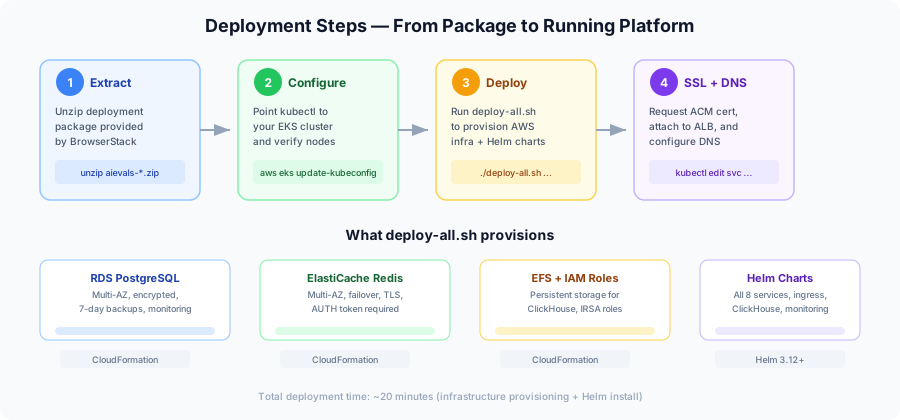
BrowserStack provides a deployment package (aievals-onprem-<version>.zip) containing everything needed to deploy the platform. The package includes:
- Helm charts — Umbrella chart that deploys all application services, ClickHouse, and ingress configuration
- CloudFormation templates — Provisions RDS PostgreSQL, ElastiCache Redis, EFS, IAM roles, and security groups
- Deployment scripts — Single script (
deploy-all.sh) that orchestrates the full setup - IAM template — Optional CloudFormation template to create an IAM user with the required permissions
Prerequisites
Cluster Requirements
| Requirement | Value |
|---|---|
| Kubernetes | 1.24+ |
| Node OS | Amazon Linux 2 or Ubuntu |
| Architecture | arm64 or amd64 |
| Nodes | Minimum 3 (for high availability) |
| Recommended instances | m5.large or larger |
| CPU / Memory (minimum) | 4,728m / 14,768Mi |
| CPU / Memory (max with autoscaling) | 8,956m / 27,648Mi |
| Storage | 110Gi |
AWS Resources
Before deploying, you need these AWS resources in place:
- VPC with private subnets
- EKS cluster with EC2 managed node groups
- IAM user with CloudFormation and EKS full access
- AWS CLI profile configured
A CloudFormation template is included in the deployment package to create the IAM user with the required permissions.
Tools
AWS CLI 2.x, kubectl 1.24+, and Helm 3.12+.
Deployment Steps
Step 1: Extract the Package
unzip aievals-onprem-<version>.zip
cd self-serve
Step 2: Configure Kubernetes Context
aws eks --region <region> update-kubeconfig \
  --name <cluster-name> \
  --alias <cluster-name> \
  --profile <aws-profile>
Verify:
kubectl get nodesYou should see at least 3 nodes in Ready state.
Step 3: Run the Deployment Script
This provisions all AWS infrastructure and installs the Helm charts:
./scripts/deploy-all.sh \
  --vpc-id <vpc-id> \
  --subnet-ids <subnet-id-1>,<subnet-id-2> \
  --eks-sg-id <security-group-id> \
  --cluster-name <cluster-name> \
  --region <region> \
  --aws-profile <aws-profile> \
  --namespace <namespace> \
  --aws-tags "<key1>=<value1>,<key2>=<value2>" \
  --s3-bucket <bucket-name> \
  --s3-region <region> \
  --deployment-id <deployment-id>
All parameters expect IDs, not ARNs.
Step 4: Set Up SSL
- Go to AWS Console > Certificate Manager (ACM) in your EKS region
- Request a public certificate for your domain (e.g.,
evals.your-domain.com) - Complete DNS validation and wait for Issued status
- Copy the Certificate ARN
Step 5: Configure SSL and Domain
Attach the certificate to the load balancer:
kubectl edit svc evals-nginx-controller-lb -n <namespace>Add the annotation:
service.beta.kubernetes.io/aws-load-balancer-ssl-cert: <certificate-arn>Set your domain on the ingress:
kubectl edit ingress evals-evals-platform-routes -n <namespace>- host: evals.your-domain.comStep 6: Verify
Your platform is now accessible at https://evals.your-domain.com.
kubectl get pods -n <namespace>All pods should show Running status.
Upgrades
cd self-serve/helm/charts/aievals
helm dependency update
helm upgrade aievals . -n <namespace>
Uninstall
helm uninstall aievals -n <namespace>

aws cloudformation delete-stack --stack-name aievals-rds
aws cloudformation delete-stack --stack-name aievals-redis
aws cloudformation delete-stack --stack-name aievals-eks-iam
Uninstalling deletes all application data. Back up your PostgreSQL database and S3 artifacts first.
Troubleshooting
| Issue | What to check |
|---|---|
| Pods not starting | kubectl describe pod <pod> -n <ns> — look for image pull errors or resource limits |
| Ingress not routing | kubectl describe ingress evals-evals-platform-routes -n <ns> — verify ALB, cert ARN, and DNS |
| Database connection failures | Confirm RDS security group allows port 5432 from EKS nodes |
| General Helm issues | helm status aievals -n <ns> or rollback with helm rollback aievals <rev> -n <ns> |
Related
- Getting Started — Set up API keys and start sending traces
- SDK Setup — Instrument your applications