Voice agents
Connect an agent that makes or takes phone calls, and run simulated voice conversations against it.
Voice agents
A voice agent is tested over a real phone call: the simulator speaks and listens on the line, playing the user while your agent handles the call. Instead of mapping an HTTP response, you tell AI Evals how the call gets started — your agent either dials in (outbound) or answers a call (inbound).
Voice evaluation is rolling out gradually and may not be enabled for your project yet. Contact support to enable it.
Create a voice agent
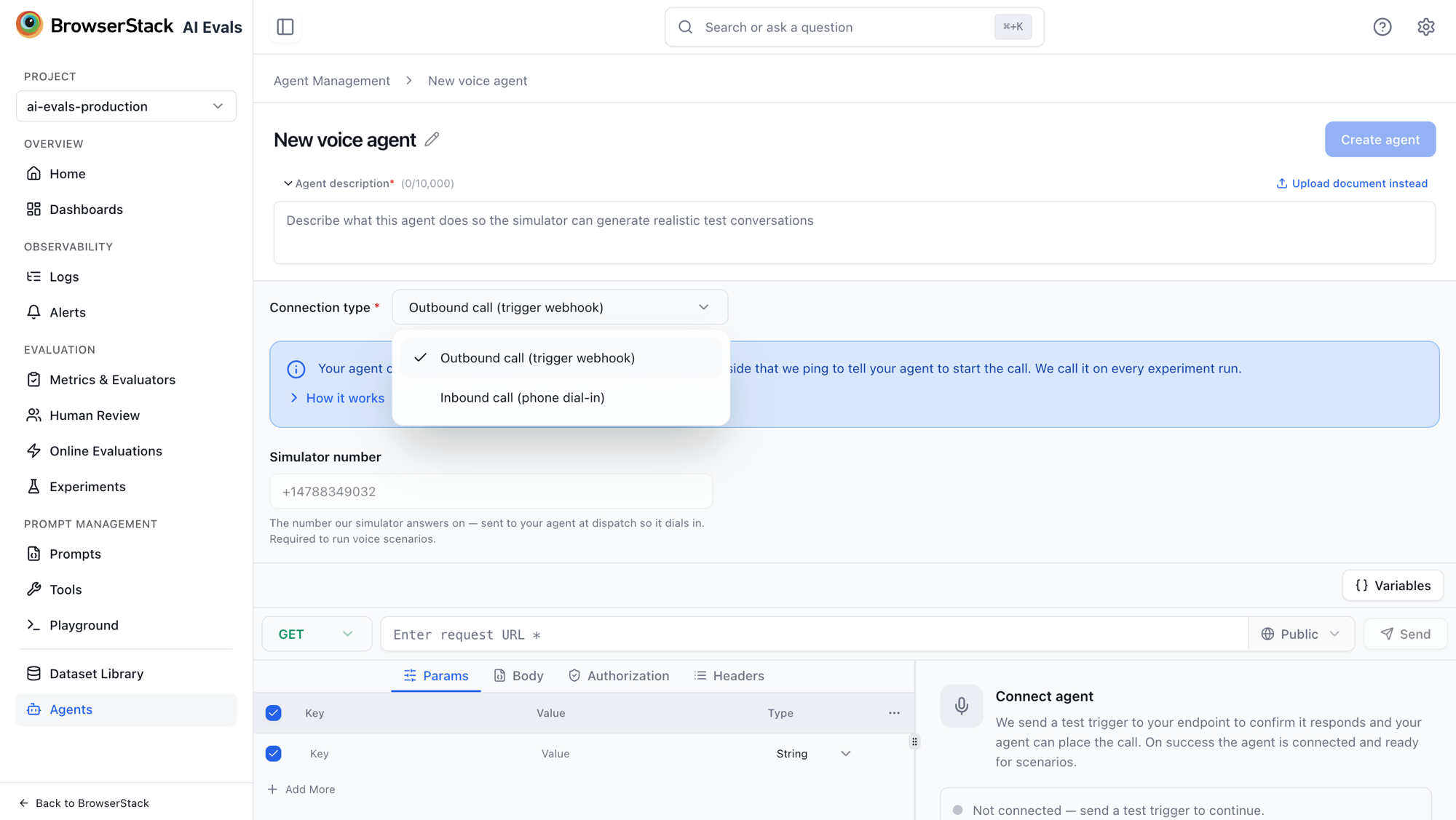
On the Agent Management page, click Add agent and choose Voice agent — "Test an agent that makes or takes phone calls." Name and describe the agent as usual (the description grounds voice scenario generation), then pick the Connection type:
- Outbound call (trigger webhook) — your agent places the call.
- Inbound call (phone dial-in) — AI Evals calls your agent.
Voice agents skip response field mapping — the conversation is captured from the call itself, so there is no Data Extraction step.
Outbound: your agent calls us
"Your agent calls us. Add your trigger endpoint below: a URL on your side that we ping to tell your agent to start the call. We call it on every experiment run."
- We call your trigger endpoint to start the test.
- Your agent places an outbound call to us.
- We connect the call to the simulator.
Configure the trigger request in the request builder — URL, method, headers, body, and any authentication your endpoint needs. The read-only Simulator number field shows the number our simulator answers on; it is sent to your agent at dispatch so it dials in.
Connect and verify
Use the Connect agent panel to validate the setup: "We send a test trigger to your endpoint to confirm it responds and your agent can place the call. On success the agent is connected and ready for scenarios."
Click Connect agent. The panel reports the outcome — "Connected — your agent responded and can place the call." on success, or "Couldn't reach your agent. Check the endpoint and try again." on failure, with a Retry connection action.
Inbound: we call your agent
"AI Evals calls this number and your agent answers, just like a real customer — no endpoint or webhook setup needed." Enter the phone number your agent answers on, then use Place test call to verify the connection.
Running voice simulations
Voice agents run through scenario-based simulation, not dataset experiments — when you configure a dataset experiment against an agent, only chat agents are offered. Generate voice scenarios grounded on the agent's description (the agent's channel decides the scenario kind — see Generate scenarios with Assist), then run them through the simulator.
Voice scenarios extend the persona with a voice profile that shapes how the simulated caller sounds and behaves on the line: Voice, Tone, Pacing, Accent, Reply length, Interruption style, Filler words, and how they react If they can't hear clearly.
The scenario run's agent picker lists only voice agents for voice scenarios; if none exist yet it shows "No voice agents in this project. Create one under Agent Management first."
Related
- Agents — creating and managing agents.
- Generate scenarios with Assist — scenario kinds follow the agent's channel.
- Conversation Simulator — how simulated conversations are driven and scored.
Connection modes
Configure how AI Evals talks to your agent — synchronous responses, asynchronous callbacks or SDK traces, and streaming over SSE — plus authentication, variables, and session handling.
Dashboards & Analytics
Monitor AI application quality metrics over time with customizable dashboards and widgets.